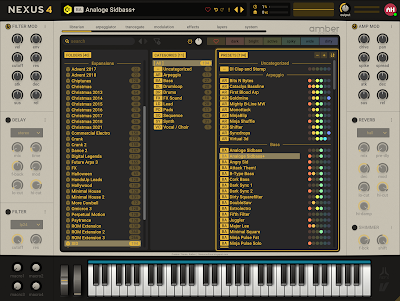
I've decided to make a new skin for Nexus 5 retro view. As always and not very surprising the colour scheme is called "aged and sun damaged 1980s plastic", or you could call it champagne if you're fancy... I'm not so, yeah, whatever.
Only the retro view of Nexus is possible to pixel push, the other tabs of the synthesizer is not.
This skin is free to download and use, you can even alter it to your own liking if you feel that is necessary. However, I would prefer it not to be included in any commercial product or sold for profit.
Saturday, November 8, 2025
Saturday, October 1, 2022
Update, Amber 4.5 for Nexus
Updated Amber skin for reFX Nexus 4.5
Copy the folder [LF_Amber 4,5] to your Nexus /Content/Skins/ folder.
Download link for Amber 4.5.
Saturday, January 1, 2022
Nexus 4 Skin, Amber
Simple sand colored skin for Nexus.
I find this colorscheme more pleasing than the inluded ones.
If you do too, feel free to download and use. Completley free.
Copy the folder [LF_Amber] to your Nexus /Content/Skins/ folder.
Download link for Amber 1.0,
Alternate version without the big dark box in the center of the ui.
Friday, February 19, 2021
Fuzzpilz Charsiesis
This is an older skin that never was completed. I decided to finish it recently and upload it to anyone who might feel they need to use it. The plugin itself is rather old and not supported on modern computers without using bit bridges or older daws.
Anyway, if you have use for it the download link is here:
Saturday, February 6, 2021
Oatmeal Lumina, 12-year anniversary update!
I've upscaled the size of the lumina skin to 1200x945 for better readability.
It should be sufficient to use with non HiDPI monitors.
There is no support for HiDPI monitors right now.
Upscaled skin can be found here:
Lumina r9 -1200x945
It should be sufficient to use with non HiDPI monitors.
There is no support for HiDPI monitors right now.
Upscaled skin can be found here:
Lumina r9 -1200x945
Sunday, January 3, 2016
Block, Yet another Poise skin.
Yet another skin for Poise the Percussion sampler.
It's actually an old unfinished project that I decided to make complete awhile ago. The skin was completed using version 1.1.50.72 of Poise but has been lightly tested on the newest 1.1.53.0 version aswell.
Feel free to use and alter to your own liking.
Get the skin here: Block 1.0 for Poise ( Updated Link, 2021 February 6th )
It's actually an old unfinished project that I decided to make complete awhile ago. The skin was completed using version 1.1.50.72 of Poise but has been lightly tested on the newest 1.1.53.0 version aswell.
Feel free to use and alter to your own liking.
Get the skin here: Block 1.0 for Poise ( Updated Link, 2021 February 6th )
Dune 2.5 - SandFlower skin updated to v1.3
I made some mistakes when updating the skin last time, mistakes (textlabels) are fixed and I also switched out the keybed graphics in this update.
Get SandFlower v1.3 here: SandFlower 1.3
( Link updated 2021 February 6th )
And a white skin, old but never released before.
Get Aer v1.0 here: Aer v1.0 ( New Link added 2021 February 6th )
Sunday, December 20, 2015
Dune 2.5 - SandFlower skin updated to v1.2
Hi,
My SandFlower skin for Dune 2 has been updated to support the new "Analog" switch found in the Amp/Filter envelope. This new addition was added in the Dune 2.5 update.
Get SandFlower v1.2 here: SandFlower 1.2
My SandFlower skin for Dune 2 has been updated to support the new "Analog" switch found in the Amp/Filter envelope. This new addition was added in the Dune 2.5 update.
Get SandFlower v1.2 here: SandFlower 1.2
( Link updated 2021 February 6th )
Thursday, March 5, 2015
Update! Dune 2.2 - Sandflower 1.1 skin
Hi,
My Dune 2.2 skin is updated, nothing big, just a few small changes so there won't be any new screen shot of the changes.
Changes are the following:
Enjoy!
My Dune 2.2 skin is updated, nothing big, just a few small changes so there won't be any new screen shot of the changes.
Changes are the following:
- Fixed the numbering bug in arpeggiator/sequencer.
- Adjusted some textcolours in the center display window.
- Made new buttons for the Voice Edit (user request). Original buttons are still available inside the skinfolder.
Download link: LF-Dune2SandFlower1.1.zip
( Link updated 2021 February 6th )Enjoy!
Sunday, January 4, 2015
Custom skin for Synapse Dune 2.2
Hi,
I made a new skin for Synapse Audio's Dune2 vsti synthesizer, the plugin is commercial so you have to own Dune 2 to be able to use this skin. You must also have atleast version 2.2 of Dune installed for skins to be selectable.
Colorscheme is based on the beige/sandy one from my previous Alchemy and Kick skins, may be abit boring but I'm actually quite fond of it.
The skin is provided free of charge.
Feel free to download here: LF-Dune2SandFlower1.0.zip
I made a new skin for Synapse Audio's Dune2 vsti synthesizer, the plugin is commercial so you have to own Dune 2 to be able to use this skin. You must also have atleast version 2.2 of Dune installed for skins to be selectable.
Colorscheme is based on the beige/sandy one from my previous Alchemy and Kick skins, may be abit boring but I'm actually quite fond of it.
The skin is provided free of charge.
Feel free to download here: LF-Dune2SandFlower1.0.zip
Friday, December 13, 2013
Sonic Academy Kick - New skin!
Hi,
I found some freetime and created something small, just in time before Christmas :)
This new skin for Sonic Acadamy's Kick synthesizer is using one of my favourite coulourschemes. This skin is free to use and alter, to be able to use this skin you need to buy the Kick synthesizer from Sonic Academy.
Download the skin here: Sonic Academy Kick - Flavours of Lime - Green.zip
I found some freetime and created something small, just in time before Christmas :)
This new skin for Sonic Acadamy's Kick synthesizer is using one of my favourite coulourschemes. This skin is free to use and alter, to be able to use this skin you need to buy the Kick synthesizer from Sonic Academy.
Download the skin here: Sonic Academy Kick - Flavours of Lime - Green.zip
Saturday, October 27, 2012
Skin updated for Alchemy 1.50
I have updated my skin for Camel Audio's Alchemy to work with version 1.50 and above.
Coloring in the new presetbrowser is abit off in Alchemy 1.50 but if you're using the current Release Candidate version of Alchemy (1.50.1) the coloring is fixed.
This skin should also work with the Player version of Alchemy.
You can download the skin at Camel Audio by going to the user library in your account at their website. This version may be abit easier to install if you are not used to use .zipfiles.
Or you can download the .zipfile here: Alchemy_Limeflavour_1.06_[v1.50]
Coloring in the new presetbrowser is abit off in Alchemy 1.50 but if you're using the current Release Candidate version of Alchemy (1.50.1) the coloring is fixed.
This skin should also work with the Player version of Alchemy.
You can download the skin at Camel Audio by going to the user library in your account at their website. This version may be abit easier to install if you are not used to use .zipfiles.
Or you can download the .zipfile here: Alchemy_Limeflavour_1.06_[v1.50]
Saturday, September 15, 2012
Ceros - A skin for Big Tick's Rhino2 synth
Hello!
Almost a year since the last post, and that's how long it took to actually complete this skin.
I did start the work on this project in October 2011 but never finished it.
I recently had a look through my backup drive and found this unfinished skin just laying around, basically finished. After editing a few images and changed a few lines of text code I can now call this a finished project. However I have not used it enough to call it glitchfree so if you happen to find any bugs feel free to report them here.
I know this skin will work on the Windows version but I can't guarantee it will function on OSX version of Rhino.
Here's the download: Ceros 1.0
Almost a year since the last post, and that's how long it took to actually complete this skin.
I did start the work on this project in October 2011 but never finished it.
I recently had a look through my backup drive and found this unfinished skin just laying around, basically finished. After editing a few images and changed a few lines of text code I can now call this a finished project. However I have not used it enough to call it glitchfree so if you happen to find any bugs feel free to report them here.
I know this skin will work on the Windows version but I can't guarantee it will function on OSX version of Rhino.
Here's the download: Ceros 1.0
Sunday, September 25, 2011
Alchemy skin updated for v1.25 of Alchemy
Hello all,
As a few of you have noticed the current release candidate of Alchemy makes the Limeflavour skin crash and revert back to the default factory skin.
This is just a small notice about this issues and that the skin have been updated to work with the upcoming version of Camel Audio Alchemy v.1.25.
Many thanks to Andy and Rob at CamelAudio who actually took the time to make the update for this skin, all I did was ask about how to fix the issues and a day later they had solved the problem and already updated my skin. Now if that isn't a support team worth praising over and over I don't know what is.
The new skin is available at your user account at Camel Audio but also as a download below.
Version 1.04 - for Alchemy 1.25
Version 1.01 - for Alchemy 1.20
As a few of you have noticed the current release candidate of Alchemy makes the Limeflavour skin crash and revert back to the default factory skin.
This is just a small notice about this issues and that the skin have been updated to work with the upcoming version of Camel Audio Alchemy v.1.25.
Many thanks to Andy and Rob at CamelAudio who actually took the time to make the update for this skin, all I did was ask about how to fix the issues and a day later they had solved the problem and already updated my skin. Now if that isn't a support team worth praising over and over I don't know what is.
The new skin is available at your user account at Camel Audio but also as a download below.
Version 1.04 - for Alchemy 1.25
Version 1.01 - for Alchemy 1.20
(Links updated 2021 February 12th)
Enjoy!
Enjoy!
Friday, May 27, 2011
Fuzzpilz Oatmeal
More skins for the Oatmeal synthesizer (freeware).
First of all, the Lumina skin is updated to R8.
Nothing fancy, just corrected the linkname on the gui that leads to the Oatmeal download. Suprisingly no one has noticed this before (Thanks Derek)
>Download here<
The bigger news is that there are 2 new skins for Oatmeal, both based on the Lumina layout.
The first skin is the Tron Legacy inspired skin built by Derek Halpenny, with small assistance from me. >Download here<
The second skin is a lighter variant of the Tron skin, desaturated and brightened to suit my taste. This skin is all done by me. >Download here<
Sunday, May 8, 2011
Alchemy skin updated to 1.01
A small notice that the Alchemy skin is now updated to version 1.01.
Issues with AlchemyPlayer is now solved and font images are also updated.
New version can be download here.
Or you can download it at Camel Audio's user library.
(Link updated 2021 February 12th)
Friday, May 6, 2011
Camel Audio Alchemy 1.20.1
Now that the new 1.20.1 verion of Alchemy is released I am also releasing my "new" skin for it.
This skin has been available trough the Camel Audio userarea as beta tester content for a few months but now it is also released to the public.
Either you login at Camel Audio to download the easy installed .CamelSounds file or you can download the Zip file and do the extracting by yourself here.
If you intend to adjust the skin in any way, please read the file named _skin.info.txt first.
This Skin is only tested on Windows 32bit but it should also work on Win64bit and Mac, however it's not tested on Mac so any bugs found could be reported here.
Sunday, April 10, 2011
Kirnu the Arpeggiator
Arto Vaarala has realease a vst arpeggiator named Kirnu. Kirnu has plenty of features such as: Easy realtime tweaking, User friendly pattern view, MIDI learn for every major control, Two independent CC controls with 'teach' functionality, Numerous of different scales, Hold mode and more.
The best part about Kirnu is that it's totally free! Actually Kirnu is a donationware plugin and be sure you send Arto some green ones if you really like and end up using Kirnu. Head over to Arto's place and download the plugin. Available formats are: VST/Win32, VST/Win32nonSSE2, VST/Win64 and VST/MacOSX32.
Now you wonder why I post this at my blog?
Yes you're right, I did help Arto with the GUI for this plugin.
The best part about Kirnu is that it's totally free! Actually Kirnu is a donationware plugin and be sure you send Arto some green ones if you really like and end up using Kirnu. Head over to Arto's place and download the plugin. Available formats are: VST/Win32, VST/Win32nonSSE2, VST/Win64 and VST/MacOSX32.
Now you wonder why I post this at my blog?
Yes you're right, I did help Arto with the GUI for this plugin.
Chris Kerry synthesizers
Vst plugins from Chris Kerry are not freeware but because of their pricing his plugins are a really good value for the money.
I helped Chris to make the GUI's for his synthesizers the "Flexoid" and the "WideBoy" more user-friendly and abit easier to navigate.
If you have'nt checked these out yet I suggest you go to Chris's website and download the demos.

I helped Chris to make the GUI's for his synthesizers the "Flexoid" and the "WideBoy" more user-friendly and abit easier to navigate.
If you have'nt checked these out yet I suggest you go to Chris's website and download the demos.

Friday, December 17, 2010
Plogue Chipsounds
Hi, it's been awhile since the last update on this blog, I have now uploaded 2 free skins for the Plogue Chipsound Synthesizer. Actually it's one skin with two different colors and they are based on the layout from the default skin.
These skins were created for the 1.5 version of Chipsounds, the plugin has been updated to 1.501 but the skins should work ok.
To install just copy the new skins folder to the Chipsounds directory, then rename the folder to GUI (make a backup/rename the original GUI folder first). Next time you start the plugin the new skin should be in use.
Download here:
Capsule 1.0
Capsule Beige 1.0

These skins were created for the 1.5 version of Chipsounds, the plugin has been updated to 1.501 but the skins should work ok.
To install just copy the new skins folder to the Chipsounds directory, then rename the folder to GUI (make a backup/rename the original GUI folder first). Next time you start the plugin the new skin should be in use.
Download here:
Capsule 1.0
Capsule Beige 1.0

Subscribe to:
Posts (Atom)